UE4自定义泛型蓝图节点
起因是在存取数据表的时候,希望蓝图节点的输入能够普适所有的结构体(只要继承自FTableRowBase)就可以,所以就去查找了相关的实现方法。
关键词: UE4, Wildcard, customThunk, Generic
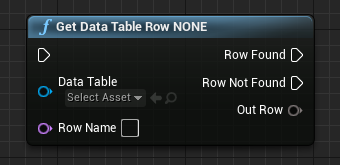
想实现的效果就是类似GetDataTableRow的输出节点
UE4的蓝图和C++都是静态类型的编程语言,因此想要蓝图节点支持任意类型的参数要么使用基类指针作为参数然后在具体实现时Cast,根据反射信息具体处理;要么使用Wildcard(通配符)实现。
因此需要先了解UE4中相应的实现方法:
继承UK2Node类,并根据需要实现其派生类,是对蓝图节点最深入的定制开发,可以在编辑模式时动态添删除蓝图节点的针脚。
使用UFUNCTION中CustomThunk说明符以及相应的类型说明符标识wildcard参数,并为该蓝图函数自定义DECLARE_FUNCTION()函数体。
第二种方式主要是利用CustomThunk标识符,使得UHT(Unreal Header Tool)不要生成默认的蓝图包装函数,而是自定定义函数体,这种方式需要手工控制蓝图的“栈”,但是相比方法1来说不需要处理蓝图的编辑器UI部分,相对简单。
泛型蓝图节点组成 函数声明 在UFUNCTION宏中包含CustomThunk说明符,泛型中具体的参数和依赖关系由meta说明符列表决定。
标识泛型函数通配符(wildcard)参数的说明符也有四种,分别为标识单个变量SingleVariable wildcard类型的”CustomStructureParam”说明符、标识容器Array的”ArrayParm”说明符、标识容器Map的”MapParam”说明符、标识容器Set的”SetParam”说明符以及各种辅助说明符。
ArrayTypeDependentParams可以描述数组参数的依赖关系
MapKeyParam和MapValueParam说明符标识的参数可以与MapParam说明符标识的参数相互依赖
SetParam说明符列表的参数之间可以使用”,” “|”两种分隔符;多个泛型参数的依赖关系由分隔符的类型决定,以逗号”,”分隔的多个泛型Set参数之间相互独立,以”|”分隔的多个泛型Set参数之间相互依赖。
自定义函数体 定义了泛型蓝图函数的Thunk函数体,主要的作用是从蓝图虚拟机中的“栈”获取传递的参数。并将值传递给执行特定功能的C++函数。
Thunk函数 对于定义在C++类中的,用UFUNCTION宏标识标志为蓝图可以调用的函数,在编译是会在generated.h文件中生成类似如下的代码块
1 2 3 4 5 6 7 8 9 10 11 12 13 14 15 16 17 18 19 20 UFUNCTION(BlueprintCallable, Category = "DataTable" , CustomThunk, meta = (CustomStructureParam = "RowData" ) ) static void AddRowToDataTable(UDataTable* DataTable, const FName RowName, const UStructProperty* RowData) ; DECLARE_FUNCTION(execAddRowToDataTable ) { P_GET_PROPERTY_REF(FObjectProperty, DataTable) ; P_GET_PROPERTY(FNameProperty, RowName) ; Stack.StepCompiledIn<FStructProperty>(NULL); Stack.Step(Stack.Object, NULL) ; FStructProperty* StructProperty = CastField<FStructProperty>(Stack.MostRecentProperty); void* StructPtr = Stack.MostRecentPropertyAddress; P_FINISH; P_NATIVE_BEGIN; Generic_AddRow(DataTable, RowName, StructProperty, StructPtr) ; P_NATIVE_END; }
Thunk函数体的语法规则
Thunk函数的基本形式,DECLARE_FUNCTION(execFunctioName){},FunctionName为函数的名称,P_FINISH前为获取函数参数的代码,P_NATIVE_BEGIN和P_NATIVE_END宏之间的是真正被调用的函数
1
2
3
4
5
6
7
8
DECLARE_FUNCTION(execFunctionName) { // Get Parameters P_FINISH; P_NATIVE_BEGIN; *(FString*)Result = Generic_FunctionName(); // Call generic function P_NATIVE_END; }
Thunk函数体在获取多个参数时,获取的先后次序与声明时的参数列表中的次序保持一致。
在Thunk函数体中,泛型蓝图函数的参数列表中确定类型的参数(如bool / uint8 / int32 / float / FName / FString等)和泛型参数(wilcard SingleVariable / TArray / TMap / TSet)获取方式不同。
确定类型的函数参数变量获取的示例:1 2 3 4 5 6 7 8 9 10 11 12 13 14 15 16 17 18 19 20 21 22 23 24 25 UFUNCTION(BlueprintCallable, Category = "MyProject" ) static void TestFunction( bool BoolVar , uint8 ByteVar , int32 IntegerVar , float FloatVar , FName NameVar , FString StringVar , const FText& TextVar , FVector VectorVar , FTransform TransformVar , UObject* ObjectVar , TSubclassOf<UObject> ClassVar , bool& RetBoolVar , uint8& RetByteVar , int32& RetIntegerVar , float& RetFloatVar , FName& RetNameVar , FString& RetStringVar , FText& RetTextVar , FVector& RetVectorVar , FTransform& RetTransformVar , UObject*& RetObjectVar , TSubclassOf<UObject>& RetClassVar ) ;
1 2 3 4 5 6 7 8 9 10 11 12 13 14 15 16 17 18 19 20 21 22 23 24 25 26 DECLARE_FUNCTION(execTestFunction) \ { \ P_GET_UBOOL(Z_Param_BoolVar); \ P_GET_PROPERTY(FByteProperty, Z_Param_ByteVar); \ P_GET_PROPERTY(FIntProperty, Z_Param_IntegerVar); \ P_GET_PROPERTY(FFloatProperty, Z_Param_FloatVar); \ P_GET_PROPERTY(FNameProperty, Z_Param_NameVar); \ P_GET_PROPERTY(FStrProperty, Z_Param_StringVar); \ P_GET_PROPERTY_REF(FTextProperty, Z_Param_Out_TextVar); \ P_GET_STRUCT(FVector, Z_Param_VectorVar); \ P_GET_STRUCT(FTransform, Z_Param_TransformVar); \ P_GET_OBJECT(FObject, Z_Param_ObjectVar); \ P_GET_OBJECT(FClass, Z_Param_ClassVar); \ P_GET_UBOOL_REF(Z_Param_Out_RetBoolVar); \ P_GET_PROPERTY_REF(FByteProperty, Z_Param_Out_RetByteVar); \ P_GET_PROPERTY_REF(FIntProperty, Z_Param_Out_RetIntegerVar); \ P_GET_PROPERTY_REF(FFloatProperty, Z_Param_Out_RetFloatVar); \ P_GET_PROPERTY_REF(FNameProperty, Z_Param_Out_RetNameVar); \ P_GET_PROPERTY_REF(FStrProperty, Z_Param_Out_RetStringVar); \ P_GET_PROPERTY_REF(FTextProperty, Z_Param_Out_RetTextVar); \ P_GET_STRUCT_REF(FVector, Z_Param_Out_RetVectorVar); \ P_GET_STRUCT_REF(FTransform, Z_Param_Out_RetTransformVar); \ P_GET_OBJECT_REF(FObject, Z_Param_Out_RetObjectVar); \ P_GET_OBJECT_REF_NO_PTR(TSubclassOf<UObject>, Z_Param_Out_RetClassVar); \ P_FINISH; \ } \
获取泛型类型的参数变量
获取泛型参数需要同时获取变量地址void* 以及变量属性FProperty*/FArrayProperty*/FMapProperty*/FSetProperty*
每一种Property都有两个基本属性,PropertyAddress和Property Size。不同类型的Property除了内存地址不一样,所占用的内存空间也不同。
对于派生与FProperty类的类型,都可以直接使用FProperty* 指示空间大小。
对于Map/Array/Set则需要分别使用FMapProperty*/FArrayProperty*/FSetProperty*来表示。
1 2 3 4 5 6 7 8 9 10 11 12 13 14 15 16 17 18 19 20 21 Stack .StepCompiledIn<FStructProperty>(NULL );void * SrcPropertyAddr = Stack .MostRecentPropertyAddress;FProperty* SrcProperty = Cast<FProperty>(Stack .MostRecentProperty); Stack .StepCompiledIn<FArrayProperty>(NULL );void * SrcArrayAddr = Stack .MostRecentPropertyAddress;FArrayProperty* SrcArrayProperty = Cast<FArrayProperty>(Stack .MostRecentProperty); Stack .MostRecentProperty = nullptr;Stack .StepCompiledIn<FMapProperty>(NULL );void * SrcMapAddr = Stack .MostRecentPropertyAddress;FMapProperty* SrcMapProperty = Cast<FMapProperty>(StackMostRecentProperty); Stack .MostRecentProperty = nullptr;Stack .StepCompiledIn<FSetProperty>(NULL );void * SetAddr = Stack .MostRecentPropertyAddress;FSetProperty* SetProperty = Cast<FSetProperty>(Stack .MostRecentProperty);
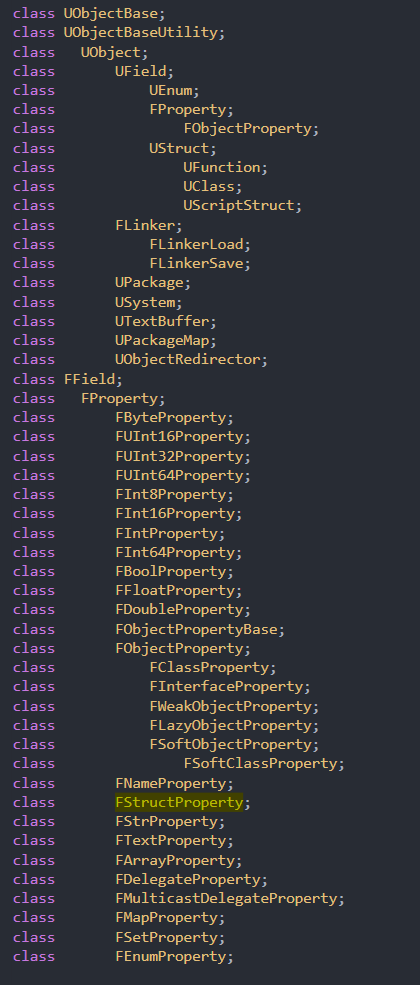
下图是UE4.26版本的类型以及属性继承关系图,获取的泛型参数变量类型根据下图所示
真正执行的函数逻辑 对于执行逻辑的函数体,主要的作用就是根据获取到的参数变量地址以及变量属性,进行处理;或者是输出参数。
可以参考的引擎源码
在KismetLibrary中已经提供了一个获取数据表对应行结构体的节点
这个节点定义的源文件位于.\UE_4.26\Engine\Source\Runtime\Engine\Classes\Kismet\DataTableFunctionLibrary.h中
相对应的Cpp文件位于UE_4.26\Engine\Source\Runtime\Engine\Private\DataTableFunctionLibrary.cpp中
对于泛型参数为SingleVariable的节点可以参考其中的写法,对于Array/Map/Set结构可以参考KistmetArrayLibrary/BlueprintMapLibrary/BlueprintSetLibrary文件。
Array/Map/Set结构主要是利用UE的反射机制,借助FScriptArrayHelper/FScriptMapHelper/FScriptSetHelper来对泛型变量进行赋值操作。
数据表DataTable相关的泛型方法 在实际项目中,经常会遇到对数据表的读取与处理,如果不在C++中写方法节点,蓝图对数据表的支持函数只有获取行RowNames(也就是行名称,第一列),以及根据RowName获取蓝图的行,这个获取行结构体的蓝图节点就是一个泛型操作。
而且在项目中导入数据表格时,必须要指定表格对应的结构体,而通过c++进行读取表格更加方便,可以通过泛型不指定表格的结构体直接进行处理。
对表格添加行 首先在.h文件中添加方法的定义,输入的参数包括表格,添加行的行名RowName,具体的添加行的结构体。正如上文所说,在定义方法的时候,需要添加CustomThunk标识符,并在meta后说明具体的泛型参数,在后续的并且说明具体的执行函数。
1 2 3 4 5 6 7 8 9 10 11 12 13 14 15 16 17 18 19 20 UFUNCTION(BlueprintCallable, Category = "DataTable" , CustomThunk, meta = (CustomStructureParam = "RowData" ) ) static void AddRowToDataTable(UDataTable* DataTable, const FName RowName, const UStructProperty* RowData) ; static void Generic_AddRow(UObject* DataTable, const FName RowName, const FStructProperty* StructProperty, const void * StructPtr) ; DECLARE_FUNCTION(execAddRowToDataTable ) { P_GET_PROPERTY_REF(FObjectProperty, DataTable) ; P_GET_PROPERTY(FNameProperty, RowName) ; Stack.StepCompiledIn<FStructProperty>(NULL); Stack.Step(Stack.Object, NULL) ; FStructProperty* StructProperty = CastField<FStructProperty>(Stack.MostRecentProperty); void* StructPtr = Stack.MostRecentPropertyAddress; P_FINISH; P_NATIVE_BEGIN; Generic_AddRow(DataTable, RowName, StructProperty, StructPtr) ; P_NATIVE_END; }
然后在.cpp文件中定义具体的执行函数的方法,需要添加判断,如果添加的行结构体和表格的行结构体相同,则进行添加(并且需要判断行名是否重复)否则报出错误。
1 2 3 4 5 6 7 8 9 10 11 12 13 14 15 16 17 18 19 20 21 void UDataTable_Extend::Generic_AddRow(UObject* DataTable, const FName RowName, const FStructProperty* StructProperty, const void * StructPtr){ UDataTable* Table = Cast <UDataTable>(DataTable); UScriptStruct* Rowstruct = StructProperty->Struct; if (Rowstruct == Table ->RowStruct) { FTableRowBase* row = (FTableRowBase*)StructPtr; void * RowPtr = Table ->FindRowUnchecked(RowName); if (RowPtr == nullptr) { Table ->AddRow(RowName, *row ); } else { UE_LOG(LogDataTable_Extend, Warning , TEXT("AddRow : Requested RowName exist")); } } else UE_LOG(LogDataTable_Extend, Warning , TEXT("Struct is not suitable")); return ; }
对表格判断是否存在该行 .h 根据RowName判断是否存在该行名,如果存在,则返回该行
1 2 3 4 5 6 7 8 9 10 11 12 13 14 15 16 17 18 19 20 UFUNCTION(BlueprintCallable, Category = "DataTable" , CustomThunk, meta = (CustomStructureParam = "RowData" ) ) static bool FindRowInDataTable(UDataTable* DataTable, const FName RowName, FTableRowBase& RowData) ; static bool Generic_FindRow(UObject* DataTable, const FName RowName, FStructProperty* StructProperty, void * StructPtr) ; DECLARE_FUNCTION(execFindRowInDataTable ) { P_GET_PROPERTY_REF(FObjectProperty, DataTable) ; P_GET_PROPERTY(FNameProperty, RowName) ; Stack.StepCompiledIn<FStructProperty>(NULL); Stack.Step(Stack.Object, NULL) ; FStructProperty* StructProperty = CastField<FStructProperty>(Stack . void* StructPtr = Stack.MostRecentPropertyAddress; P_FINISH; P_NATIVE_BEGIN; *(bool *)RESULT_PARAM = Generic_FindRow(DataTable, RowName, StructProperty, StructPtr) ; P_NATIVE_END; }
.cpp中的实现
1 2 3 4 5 6 7 8 9 10 11 12 13 14 15 16 17 18 19 20 21 22 bool UDataTable_Extend::Generic_FindRow(UObject* DataTable, const FName RowName, FStructProperty* StructProperty, void * StructPtr){ const FString& Context = FString(); UDataTable* Table = Cast <UDataTable>(DataTable); if (StructProperty->Struct == Table ->RowStruct) { void * RowPtr = Table ->FindRowUnchecked(RowName); if (RowPtr == nullptr) { UE_LOG(LogDataTable_Extend, Warning , TEXT("FindRow : requested row %s not in DataTable."), *RowName.ToString()); return false ; } const UScriptStruct* StructType = Table ->GetRowStruct(); StructType->CopyScriptStruct(StructPtr, RowPtr); return true ; } else { UE_LOG(LogDataTable_Extend, Warning , TEXT("FindRow : Struct is not suitable")); return false ; } }
获取表格的行数组 这个方法需要涉及到List数组结构的读取。
1 2 3 4 5 6 7 8 9 10 11 12 13 14 15 16 17 18 19 UFUNCTION (BlueprintCallable, Category = "DataTable" , CustomThunk, meta = (ArrayParm = "RowList" )) static void GetRowList (UDataTable* DataTable, TArray<FTableRowBase>& RowList) static void Generic_GetRowList (UObject* DataTable, FArrayProperty* ArrayProperty, void * ArrayAddr) DECLARE_FUNCTION (execGetRowList){ P_GET_PROPERTY_REF (FObjectProperty, DataTable); Stack.StepCompiledIn<FArrayProperty>(NULL ); FArrayProperty* ArrayProperty = CastField<FArrayProperty>(Stack.MostRecentProperty); void * ArrayAddr = Stack.MostRecentPropertyAddress; P_FINISH; P_NATIVE_BEGIN; Generic_GetRowList (DataTable, ArrayProperty, ArrayAddr); P_NATIVE_END; }
.cpp中的实现,需要的数组进行判断,如果数组的元素不是结构体,则报错;如果结构体与表格结构不同,则报出警告。
1 2 3 4 5 6 7 8 9 10 11 12 13 14 15 16 17 18 19 20 21 22 23 24 25 26 27 void UDataTable_Extend::Generic_GetRowList(UObject* DataTable, FArrayProperty* ArrayProperty, void* ArrayAddr) { UDataTable* Table = Cast<UDataTable>(DataTable); if (ArrayProperty->nner ->"StructProperty" )) { UE_LOG(LogDataTable_Extend, Warning, TEXT("GetRowList : Map value is not TableRowBase. " )); } else { FStructProperty * RowStruct = CastField<FStructProperty>(ArrayProperty-> if (RowStruct->truct == Table-> { const TMap<FName, uint8*> RowMap = Table-> FScriptArrayHelper ArrayHelper(ArrayProperty, ArrayAddr); FProperty * InnerProp = ArrayProperty-> for (auto It = RowMap.CreateConstIterator(); It; ++It) { int32 LastIndex = ArrayHelper.AddValue(); InnerProp ->opySingleValueToScriptVM (ArrayHelper.GetRawPtr(LastIndex), It-> } } else { UE_LOG(LogDataTable_Extend , Warning, TEXT("GetRowList : Struct %s is not suitable. "), *ArrayProperty->nner -> } } }
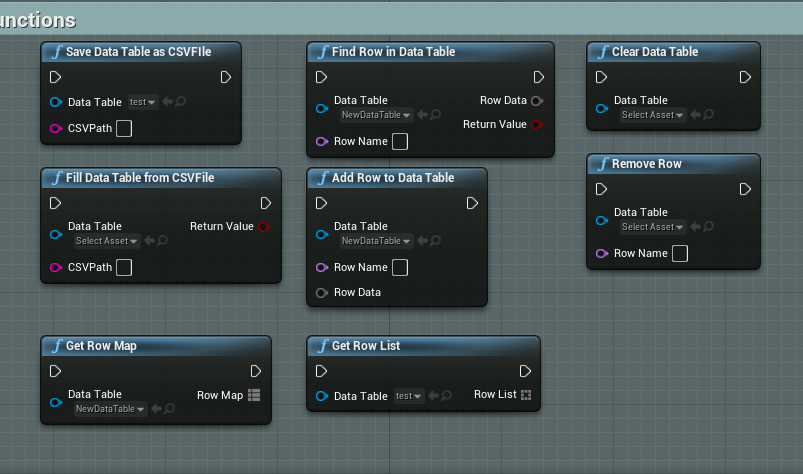
最后实现的方法有:
参考:
https://zhuanlan.zhihu.com/p/149838096 https://zhuanlan.zhihu.com/p/149869329 https://zhuanlan.zhihu.com/p/148209184 https://neil3d.github.io/unreal/blueprint-wildcard.html